
This app functions as the central interface for configuring system-wide settings that apply to all components of anyContact innoACD. Individual configuration parameters are described here in detail.

General Settings
|
Configuration parameter |
Description |
|---|---|
|
Mandatory Skill Timer |
This parameter defines the system-wide timeout for a mandatory skill. After this time expires, a skill required by the queue is no longer mandatory but only preferred for the routing decision. Consequently, calls can then be handled by agents who do not possess the required skill set. This global setting is overridden by the individual skill settings in AC Queue Admin if configured there. Note: Set the value to 0 if mandatory skills should never expire. The skill then remains mandatory throughout the entire waiting time. |
|
Ring time to RONA |
This parameter defines the maximum time (in seconds) that an incoming call is offered to an agent before it is considered a RONA (Redirect On No Answer). If the call is not accepted within this period, it is automatically returned to the queue or forwarded to another available agent. The agent who did not answer the call is automatically set to “Not Available.” |
|
Short call timer |
Short calls are defined as calls that remain in the queue or in conversation with an agent for less than a system-wide configurable duration.
|
Advanced Settings
|
Configuration parameter |
Description |
|---|---|
|
Transfer strategy |
The transfer strategy distinguishes between two variants:
Note: If the agent actively rejects the call, it is not returned to the queue and is considered lost.
|
Contact Codes
Contact codes allow agents to classify customer contacts directly in the agent interface. Individually defined codes can be used to record the reason for or outcome of a call and assign the contact to a clear category.
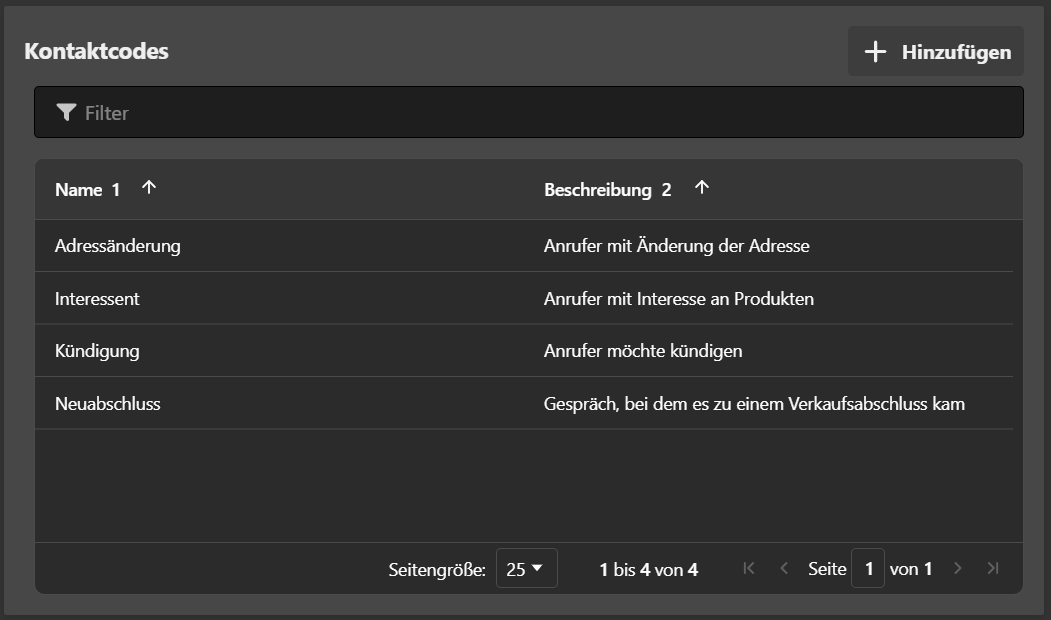
New contact codes can be created globally using the “Add” button. Selecting this button opens the form for creating a new contact code on the right-hand side of the window. Enter a name and, optionally, a description.
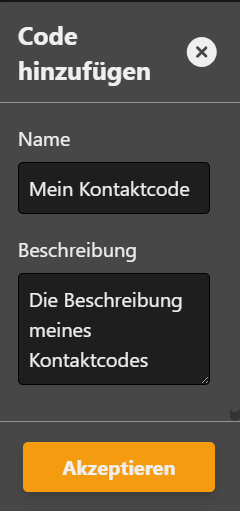
Select an existing contact code to edit or delete it.
Note: Deleting a contact code performs a soft delete. Existing statistics for the deleted code remain available for analysis. If a new contact code is subsequently created with the same name, the previously deleted code is restored.
Globally defined contact codes must then be assigned to the appropriate queues in AC Queue Admin. Agents can only select codes assigned to the queue of the incoming contact.
Features

|
Configuration parameter |
Description |
|---|---|
|
Display personal performance in AC Agent |
Default setting applied when a team is created. It determines whether agents are offered the option to view their personal performance in AC Agent. |
License Settings
At the bottom of the user interface, there is a function called “Add License” which allows additional licenses to be imported.
Each license is always tied to the end customer and is stored using a unique license key. Licensing is cumulative—existing licenses can be expanded at any time.
Example:
If an initial license for 30 agents is imported and later needs to be extended by 10 more agents, only an additional license key for 10 agents must be obtained and imported via the “Add License” function. The total number of licensed agents will then automatically increase to 40.
Note: It is not necessary to replace or overwrite the existing license— all valid license keys are processed additively by the system along with their respective validity periods.
Above the license key input field, information regarding the current licensing status is displayed.
