
In addition to the apps already mentioned, a dashboard is also available for real-time monitoring of activities within the platform. When the “AC Dashboard” app is launched, the user receives an overview of the various metrics for the queues and agents active in the system, as well as a history of past system alarms.
Queue View
The queues to be displayed can be filtered accordingly via the “Filter” button. By clicking on the respective list entry, the user is taken to the real-time waiting field view.
The queue view appears as follows:
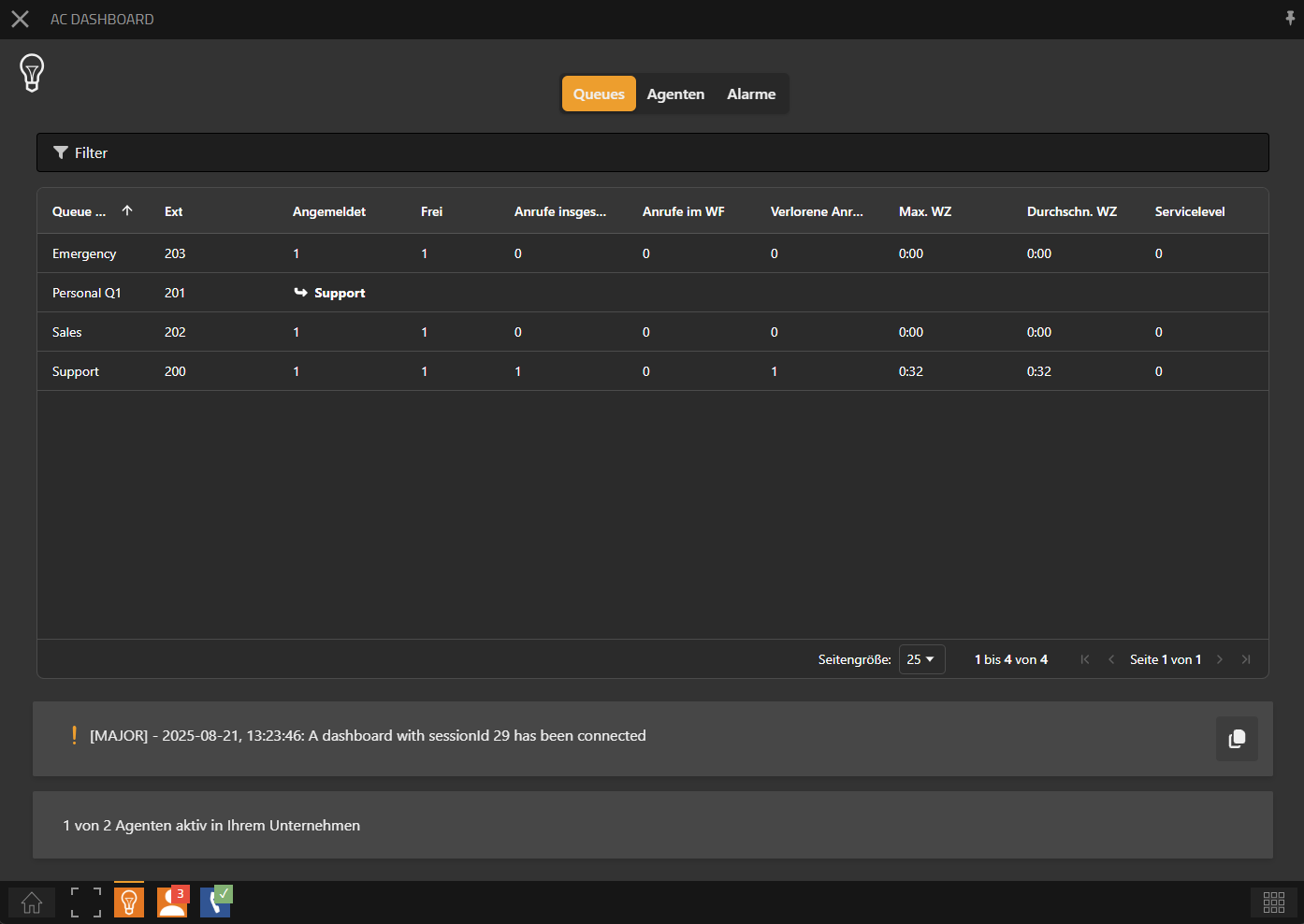
The header displays the name of the queue along with the incoming phone number in parentheses.
At the bottom, the current license utilization is shown.
Key Metrics
The following key metrics are available as of the time this document was created:
|
Metric |
Description |
|---|---|
|
Queue Name |
Name of the queue. This allows queues to be uniquely identified. |
|
Ext |
This is the extension or phone number assigned to the queue. |
|
Logged In |
Number of agents assigned to this queue who are currently logged into the system. This number includes all agents regardless of their current status (ready, busy, paused). |
|
Available |
Number of agents assigned to this queue who are logged in and currently available to take calls. |
|
Total Calls |
Total number of all calls received in this queue (including answered, lost, and still waiting calls). |
|
Calls in Waiting Queue (WF) |
Number of callers currently in the queue who have not yet been assigned to an agent. |
|
Lost Calls |
Number of calls that were not successfully delivered, e.g., because the caller hung up during the waiting time. |
|
Maximum Waiting Time (Max. WT) |
The longest waiting time a caller had in the current queue before being connected or ending the call. |
|
Average Waiting Time (Avg. WT) |
Average waiting time of all callers in this queue, calculated over a defined period (the current day). |
|
Service Level |
Measurement for the quality of queue routing. Shows the proportion of calls answered within a defined threshold (e.g., 20 seconds). Serves as a KPI to assess accessibility. The service level in this view is calculated based on the current day and reset at the start of the day (system time). It is intended to reflect the daily status of the queue. |
Waiting monitor
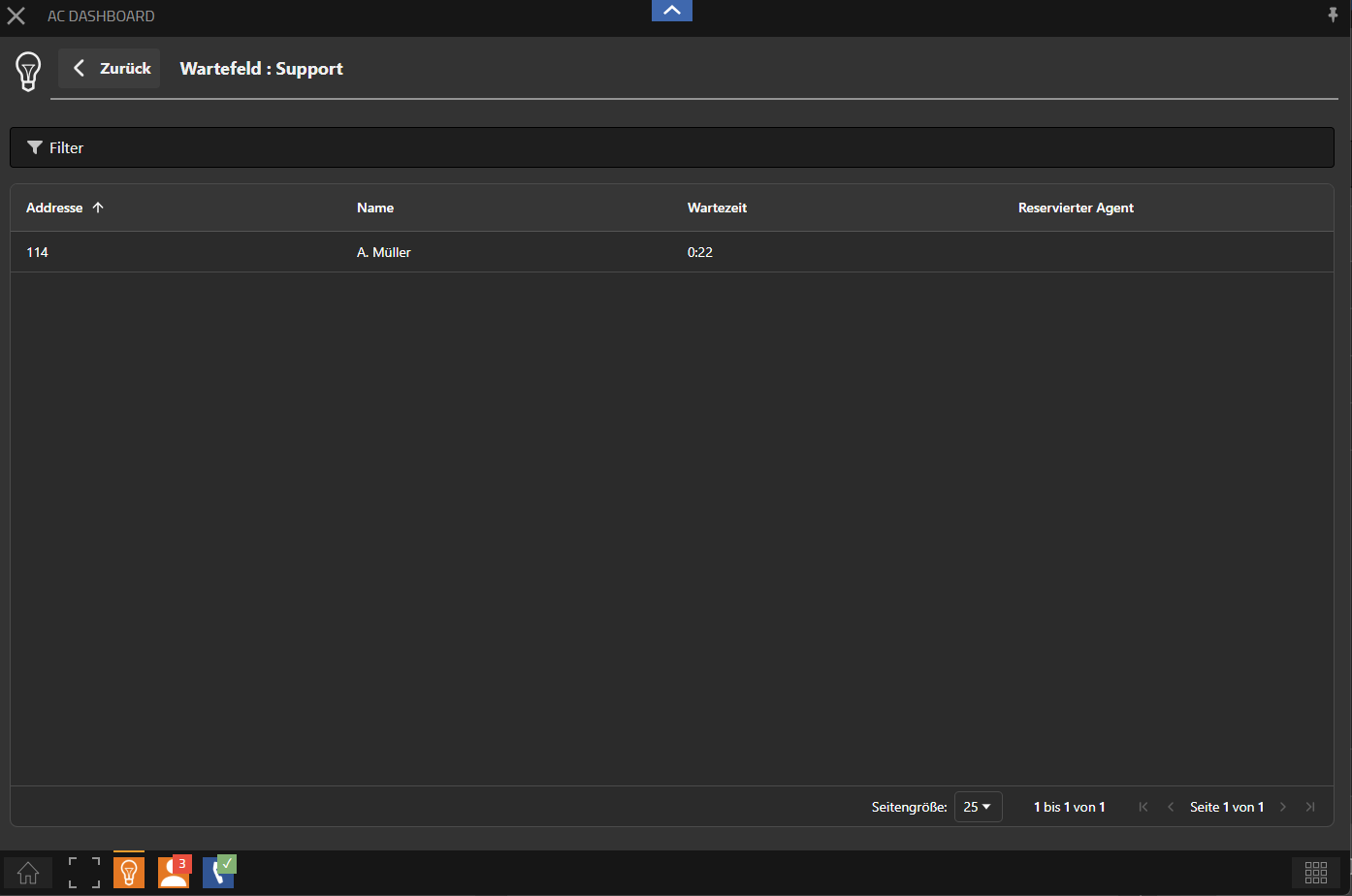
When selecting a queue in the queue view, the real-time queue view opens. This displays all currently waiting calls in a tabular format. The view can be customized individually using the integrated filter function. Additionally, the table can be sorted by the column headers – for example by waiting time, to show the longest waiting calls at the top.
Overview
|
Value |
Description |
|---|---|
|
Caller ID |
This field visualizes the caller identification. Usually, this is the caller's phone number. |
|
Name |
If a name resolution of the caller is possible, the name will be displayed here accordingly. |
|
Waiting Time |
This is the current waiting time of the caller. |
|
Reserved Agent |
If the call is already in transfer status to an agent, the name of the agent who will be assigned the call is displayed here. |
Agent View
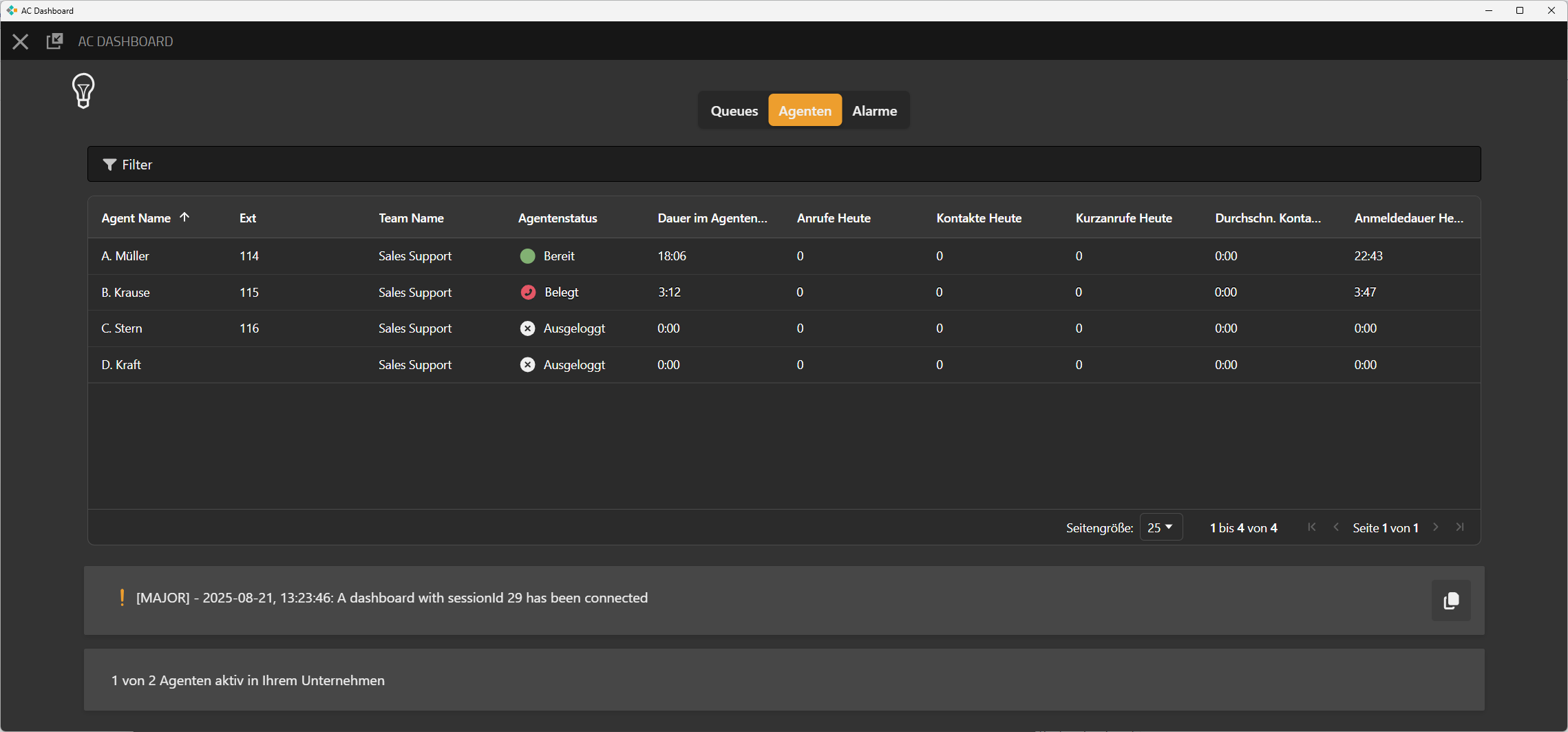
The agents to be displayed can be filtered using the “Filter” button.
The queue view appears as follows:
Key Metrics Overview
|
Metric |
Description |
|---|
|
Metric |
Description |
|---|---|
|
Agent Name / Ext |
Display name of the agent as well as their internal extension. Used for unique identification of the agent. |
|
Team Name |
Affiliation of the agent to a specific team or group. Allows structuring agents by departments or functions. |
|
Agent Status |
Current status of the agent in the system (e.g., Ready, Busy, Break, Logged Out). Crucial for routing logic and availability. |
|
Duration in Agent Status |
Time span the agent has already spent in the current status. Useful for analyzing availability and break behavior. |
|
Calls Today |
Number of calls the agent has answered on the current day. |
|
Contacts Today |
Total number of all handled calls where a contact lasted longer than the defined short call time in the system or conversation. |
|
Short Calls Today |
Number of calls with a duration below a defined minimum call time (e.g., under 3 seconds). Used to detect wrong calls or immediate hang-ups. |
|
Average Call Duration |
Average duration of all calls of the agent on the current day. Indicator of call length and workload. |
|
Login Duration |
Total time the agent was logged into the system on the current day (regardless of status). Important for working time and activity statistics. |